KARLAUDIO

Verb Engine

Reverb you can match to a reference.

Verb Engine listens to a track or a .wav with the room sound you want, measures it, and sets itself up to match. Or skip that and pick one of five rooms, from a short ambience to a cathedral.

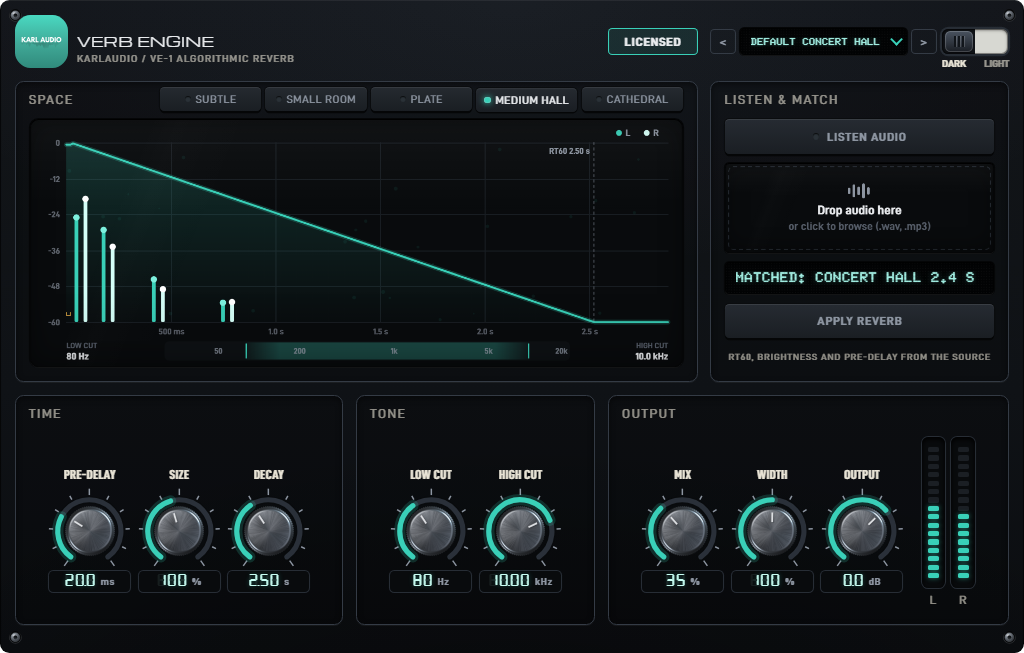
Verb Engine plugin window with the room modes, the reverb display, the Listen and Match panel, and the time, tone and output controls.

What it does

Room modes

  • Subtle: short ambience that does not crowd vocals or drums.
  • Small Room: tight reflections like a studio live room.
  • Plate: dense and bright, with no gap before the reverb. Made for snares and vocals.
  • Medium Hall: a warm concert hall.
  • Cathedral: a huge space with tails up to 20 seconds.

Listen and Match

  • Press Listen Audio and play a track that has the reverb you want, or drop a .wav or .mp3 file.
  • Verb Engine measures the decay time, the brightness, and the early reflections.
  • It picks the closest room mode and shows what it found, for example a concert hall with 2.4 seconds of decay.
  • Press Apply Reverb to use it.

Controls

Time

Pre-delay from 0 to 250 ms, size, and decay.

Tone

Low cut from 20 Hz to 1 kHz and high cut from 1 to 20 kHz.

Width

From mono to extra wide, 0 to 200 %.

Mix and Output

Dry/wet mix and output gain from -24 to +12 dB.

Presets

Eight factory presets, from a small vocal room to a very long, dark tail.

Display

Shows the early reflections for left and right and the decay curve, with the decay time marked.

Install

  • After you buy, you land on your download page. The email with your license key links back to it.
  • Activate the license key inside the plugin. It makes no sound until it is activated. One key works on up to 3 computers.
  • Windows 10 or 11, 64-bit.
  • VST3 for your DAW, plus an optional standalone app.
  • Dark and light front plate. Click any value to type it, with units like 5k, 800 ms or 30 %.
  • In FL Studio: Options, Manage plugins, Find plugins, then load Karl Audio Verb Engine (by KarlAudio) as an effect.