KARLAUDIO

Time Engine

Half speed, still on the grid.

Time Engine plays your audio at half, two-thirds or quarter speed and stays locked to your project tempo. No latency, and you can slow down just one frequency band so the hi-hats keep running.
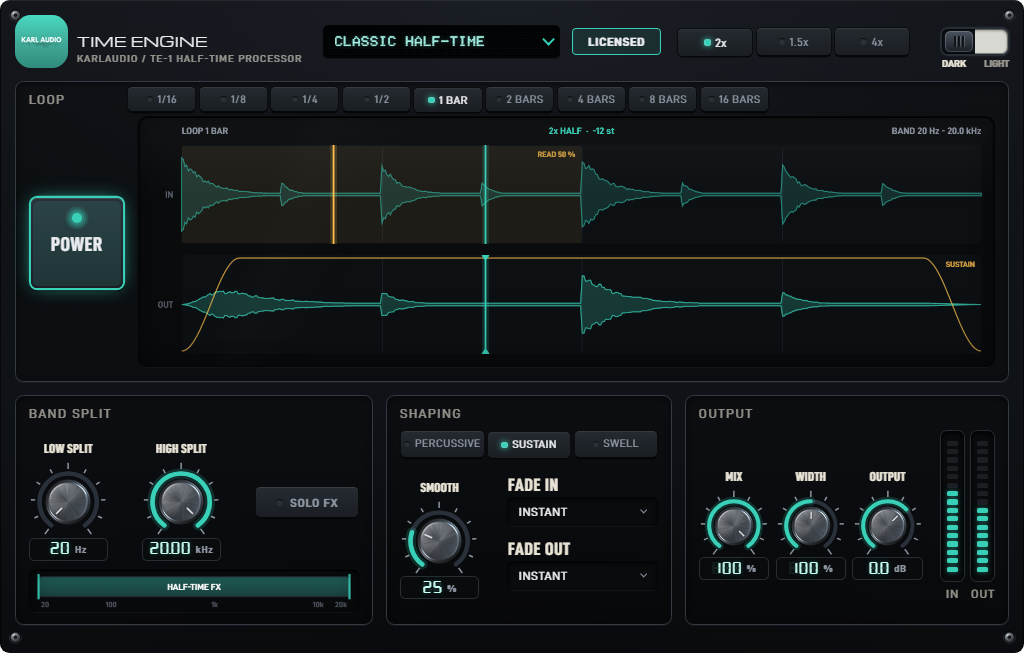
Time Engine plugin window with the loop length buttons, the loop display, and the band split, shaping and output sections.

What it does

Speed

  • 2x: half speed, one octave down.
  • 1.5x: triplet feel, a fifth down.
  • 4x: quarter speed, two octaves down.

Loop

  • Nine loop lengths, from a 1/16 note to 16 bars.
  • Locked to the song tempo and the play position of your DAW.
  • Three smoothing modes: Percussive keeps drums punchy, Sustain is smooth for chords and vocals, Swell fades in like a reversed sound.

Controls

Band Split

Slow down only the frequencies between two split points. Everything outside stays dry, so the sub and the hi-hats stay as they are. Solo FX lets you hear the slowed band alone.

Fade In and Fade Out

Blend between dry and slowed audio over a set time, from instant up to 8 bars.

Output

Mix, width from mono to 200 %, and output from -24 to +12 dB, with input and output meters.

Presets

Five factory presets in the preset menu.

Loop Display

Shows the input and the output, the read window, the fade curve, and the playhead.

Power

Switch the effect on and off in time with the song.

Install

  • After you buy, you land on your download page. The email with your license key links back to it.
  • Activate the license key inside the plugin. It makes no sound until it is activated. One key works on up to 3 computers.
  • Windows 10 or 11, 64-bit.
  • VST3 for your DAW, plus an optional standalone app.
  • Dark and light front plate. Click any value to type it.
  • In FL Studio: Options, Manage plugins, Find plugins, then load Karl Audio Time Engine (by KarlAudio) as an effect.