KARLAUDIO

Spectrum EQ

A 24-band EQ that listens.

Spectrum EQ has 24 bands that can be static or dynamic, four sidechain inputs, a resonance tamer and EQ matching. Or just draw the curve you want and let it place the bands.

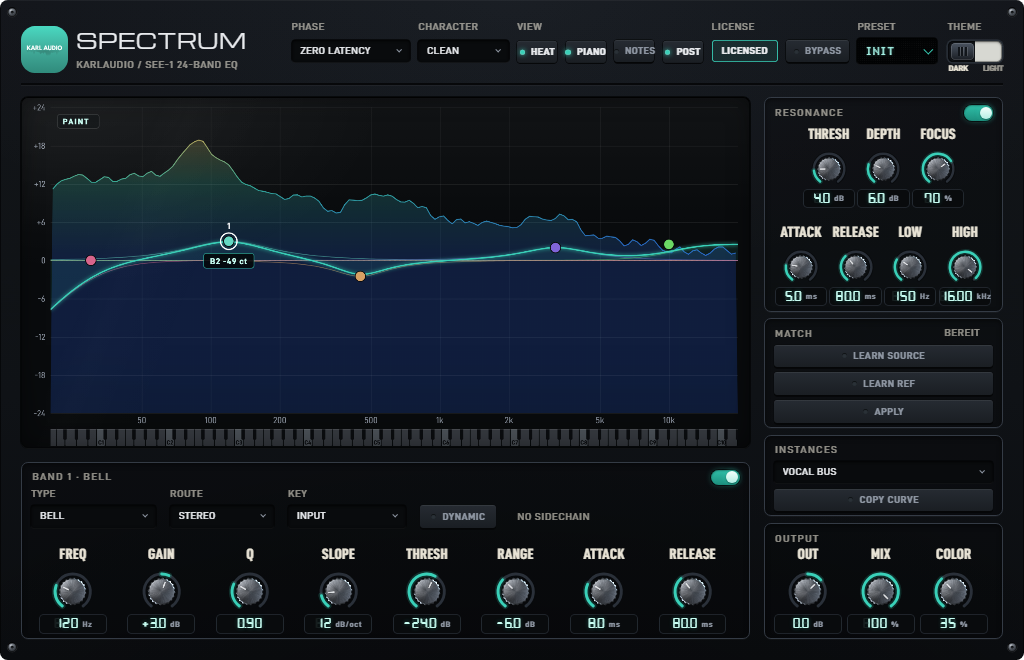
Spectrum EQ plugin window with the analyzer and EQ curve, the resonance section, EQ match, and the band strip.

What it does

24 bands

  • Double-click the graph to add a band. Double-click a band to remove it.
  • Bell, low and high shelf, low and high cut, notch, band pass, tilt, and allpass.
  • Slopes from 6 to 48 dB per octave.
  • Each band can work on stereo, left, right, mid, or side.

Dynamics and sidechain

  • Any band can move with the audio: threshold, range, attack, and release.
  • Four sidechain inputs. A band can listen to another track while it changes this one.
  • Use it to make room for a vocal in the beat, or to tame a sound only when it gets loud.

More

Phase

Zero latency, natural, linear phase, or allpass.

Character

Clean, vintage, or tube, with an amount control.

Resonance

Turns down resonances that stick out.

EQ Match

Learn a source and a reference, then apply. The reference can come from a sidechain.

Paint

Draw the curve you want. Spectrum EQ turns it into up to 12 bands.

Analyzer

A heat-coloured spectrum, a piano roll, and note snap for the bands.

Install

  • After you buy, you land on your download page. The email with your license key links back to it.
  • Activate the license key inside the plugin. It makes no sound until it is activated. One key works on up to 3 computers.
  • Windows 10 or 11, 64-bit.
  • VST3 for your DAW, plus an optional standalone app.
  • Dark and light front plate. Copy a curve to another Spectrum EQ on the same computer.
  • In FL Studio: Options, Manage plugins, Find plugins, then load Karl Audio Spectrum (by KarlAudio) as an effect.