
KARLAUDIO

Echo Engine

Every echo on its own note.

Echo Engine is a stereo delay where you set the pitch of each repeat, so one shouted word turns into a short melody. There are five delay modes, and Clear keeps the echoes quiet while you sing.

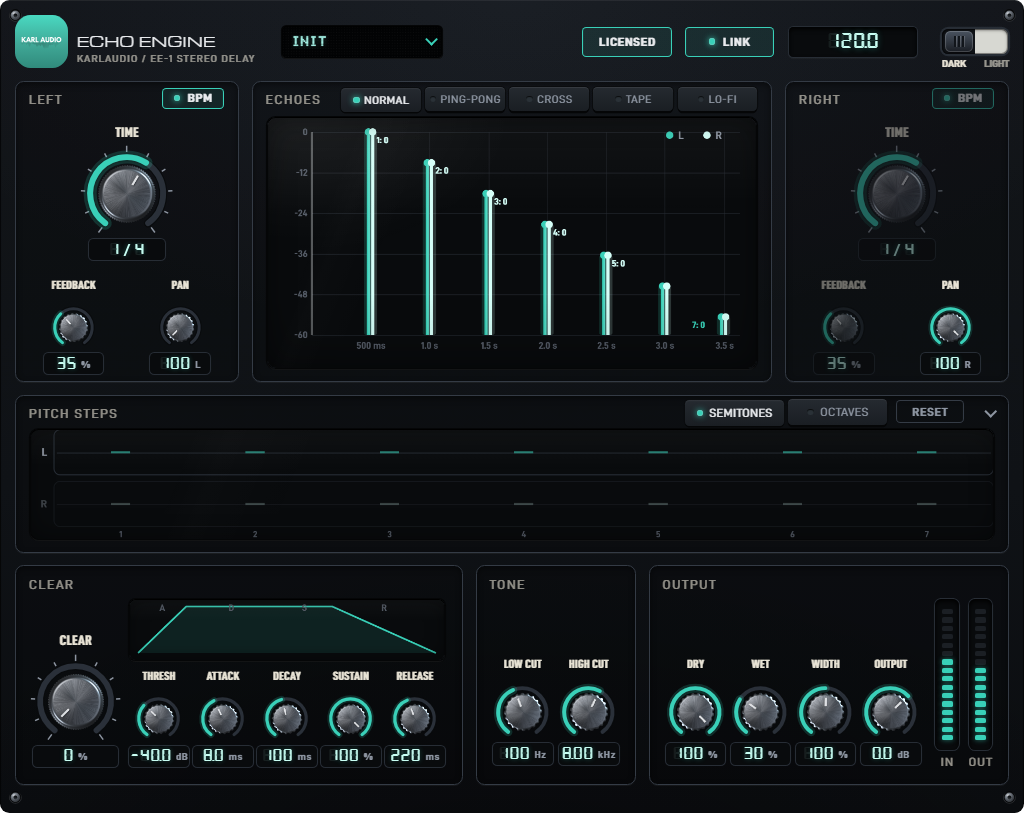
Echo Engine plugin window with left and right delay controls, the echo graph, the pitch steps lane, and the Clear, Tone and Output sections.

What it does

Delay

  • Separate left and right delay, each synced to the song tempo or set in milliseconds from 1 ms to 4 seconds.
  • 19 note divisions, from 1/64 to 2 bars, including dotted and triplet values.
  • Feedback up to 98 % with a soft limiter in the loop, so long tails stay clean.
  • Link makes the right side follow the left. Pan places each side.

Pitch Steps

  • Every repeat has its own pitch: 16 steps per side, from -24 to +24 semitones.
  • The pattern cycles, so repeat 17 uses step 1 again.
  • Drag a bar in the lane or a repeat in the echo graph. Double-click resets it.
  • Work in semitones or in octaves.

Modes and sound

Normal and Ping-Pong

Two independent delays, or repeats that bounce between left and right.

Cross

Each side feeds the other, for wide, moving echoes.

Tape

Wow, flutter, saturation, and a darker top end.

Lo-Fi

Band-limited repeats with reduced bits and sample rate.

Clear

Turns the echoes down while you sing and lets them play in the gaps. Threshold, attack, decay, sustain, and release.

Tone and Output

Low cut and high cut in the feedback loop. Dry, wet, width, and output.

Install

  • After you buy, you land on your download page. The email with your license key links back to it.
  • Activate the license key inside the plugin. It makes no sound until it is activated. One key works on up to 3 computers.
  • Windows 10 or 11, 64-bit.
  • VST3 for your DAW, plus an optional standalone app.
  • Dark and light front plate. Click any value to type it, with units like 5k, 350 ms or 30 %.
  • In FL Studio: Options, Manage plugins, Find plugins, then load Karl Audio Echo Engine (by KarlAudio) as an effect.