KARLAUDIO

Sidechain Engine

Pump any track, no kick channel needed.

Sidechain Engine ducks a track on its own clock: in time with the song, from MIDI notes, or from a drum track if you do want to route one. Pick one of 16 curves and set how hard it pumps.
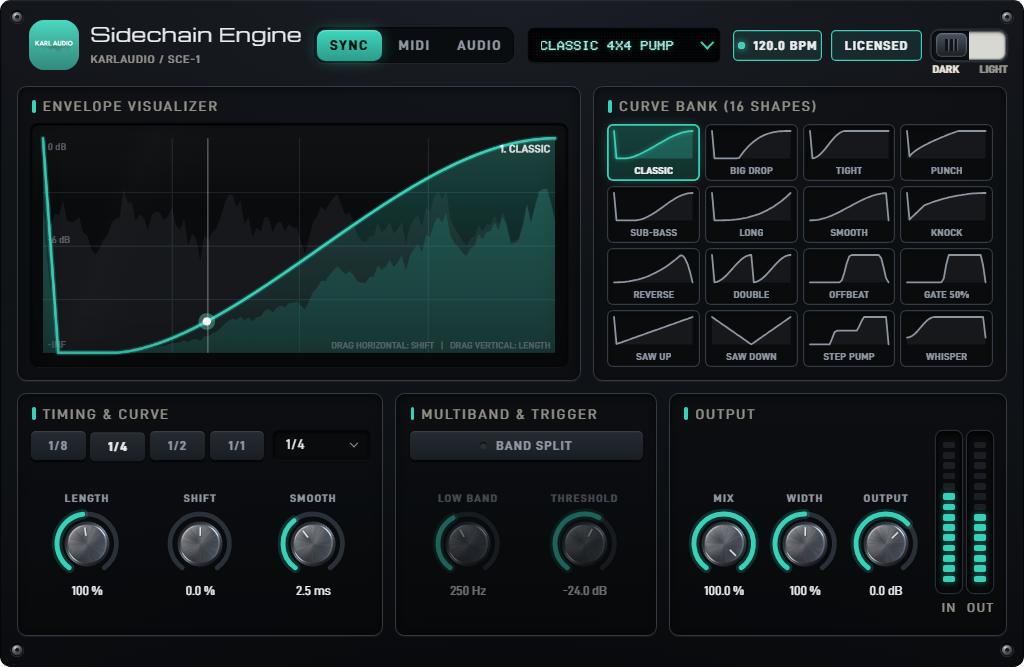
Sidechain Engine plugin window with the envelope visualizer, the curve bank with 16 shapes, and the timing, multiband and output sections.

What it does

Triggers

  • Sync: follows the song tempo, at 12 rates from 1/16 to 2 bars.
  • MIDI: every note starts the curve.
  • Audio: the curve starts when the input or the sidechain gets louder than the threshold.

Curves

  • 16 shapes, from classic and big drop to offbeat, gate, saw, and step pump.
  • Length, shift, and smooth shape the curve. Smooth stops clicks on deep bass.
  • Drag in the display: left and right shifts the curve, up and down changes its length.

Controls

Band Split

Duck only the low end below a crossover from 20 Hz to 5 kHz. The highs pass untouched.

Mix

From a gentle pump to full ducking.

Width and Output

Width from mono to 200 % and output from -24 to +12 dB, with meters.

Presets

Ten factory presets, from a classic four-to-the-floor pump to a smooth pad swell.

Visualizer

Shows the curve, the audio before and after, and the playhead.

Sidechain input

Route a drum track to the sidechain input for audio triggering.

Install

  • After you buy, you land on your download page. The email with your license key links back to it.
  • Activate the license key inside the plugin. It makes no sound until it is activated. One key works on up to 3 computers.
  • Windows 10 or 11, 64-bit.
  • VST3 for your DAW, plus an optional standalone app.
  • Dark and light front plate. Click any value to type it.
  • In FL Studio: Options, Manage plugins, Find plugins, then load Karl Audio Sidechain Engine (by KarlAudio) as an effect.